
主题
LangSmith 提供了一个协作界面,用于创建、测试和迭代提示。
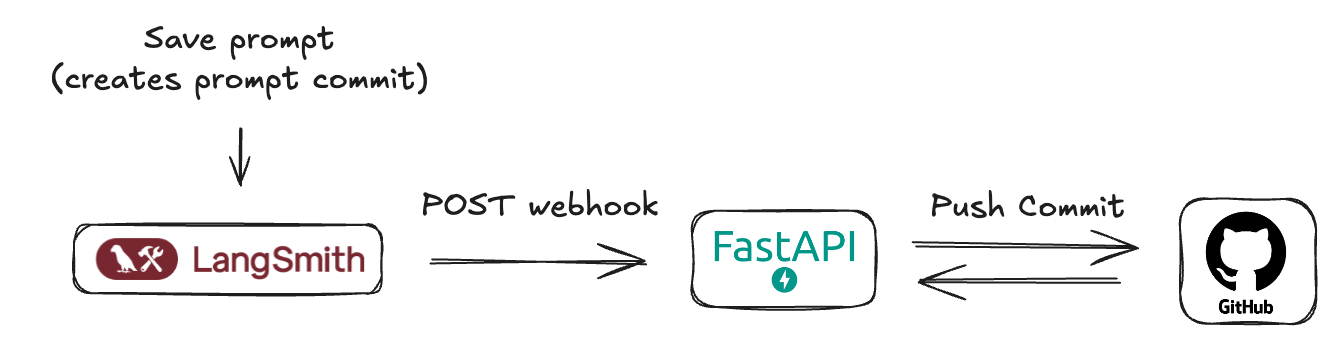
虽然您可以在运行时动态地从 LangSmith 获取提示到您的应用程序中,但您可能更倾向于将提示与您自己的数据库或版本控制系统同步。为了支持这种工作流,LangSmith 允许您通过 Webhook 接收提示更新的通知。
为什么将提示与 GitHub 同步?
- 版本控制: 在熟悉的系统中,将您的提示与应用程序代码一起进行版本控制。
- CI/CD 集成: 当关键提示发生变化时,触发自动的预发布或生产环境部署。
先决条件
在开始之前,请确保您已设置好以下内容:
- GitHub 账户: 一个标准的 GitHub 账户。
- GitHub 仓库: 创建一个新的(或选择一个现有的)仓库,用于存储您的 LangSmith 提示清单。这可以是与您的应用程序代码相同的仓库,也可以是一个专门用于提示的仓库。
- GitHub 个人访问令牌(PAT):
- LangSmith Webhook 不直接与 GitHub 交互——它们会调用一个由您创建的中间服务器。
- 此服务器需要一个 GitHub PAT 来进行身份验证并向您的仓库提交更改。
- 必须包含
repo作用域(对于公共仓库,public_repo就足够了)。 - 前往 GitHub > Settings > Developer settings > Personal access tokens > Tokens (classic)。
- 点击 Generate new token (classic)。
- 为其命名(例如,"LangSmith Prompt Sync"),设置过期时间,并选择所需的作用域。
- 点击 Generate token 并立即复制它——之后将不再显示。
- 安全地存储该令牌,并将其作为环境变量提供给您的服务器。
理解 LangSmith 的“提示提交”和 Webhook
在 LangSmith 中,当您保存对提示的更改时,本质上是在创建一个新版本或一个“提示提交”。这些提交可以触发 Webhook。
Webhook 将发送一个包含新提示清单的 JSON 负载。
示例 Webhook 负载
json
{
  "prompt_id": "f33dcb51-eb17-47a5-83ca-64ac8a027a29",
  "prompt_name": "My Prompt",
  "commit_hash": "commit_hash_1234567890",
  "created_at": "2021-01-01T00:00:00Z",
  "created_by": "Jane Doe",
  "manifest": {
    "lc": 1,
    "type": "constructor",
    "id": ["langchain", "schema", "runnable", "RunnableSequence"],
    "kwargs": {
      "first": {
        "lc": 1,
        "type": "constructor",
        "id": ["langchain", "prompts", "chat", "ChatPromptTemplate"],
        "kwargs": {
          "messages": [
            {
              "lc": 1,
              "type": "constructor",
              "id": [
                "langchain_core",
                "prompts",
                "chat",
                "SystemMessagePromptTemplate"
              ],
              "kwargs": {
                "prompt": {
                  "lc": 1,
                  "type": "constructor",
                  "id": [
                    "langchain_core",
                    "prompts",
                    "prompt",
                    "PromptTemplate"
                  ],
                  "kwargs": {
                    "input_variables": [],
                    "template_format": "mustache",
                    "template": "You are a chatbot."
                  }
                }
              }
            },
            {
              "lc": 1,
              "type": "constructor",
              "id": [
                "langchain_core",
                "prompts",
                "chat",
                "HumanMessagePromptTemplate"
              ],
              "kwargs": {
                "prompt": {
                  "lc": 1,
                  "type": "constructor",
                  "id": [
                    "langchain_core",
                    "prompts",
                    "prompt",
                    "PromptTemplate"
                  ],
                  "kwargs": {
                    "input_variables": ["question"],
                    "template_format": "mustache",
                    "template": "{{question}}"
                  }
                }
              }
            }
          ],
          "input_variables": ["question"]
        }
      },
      "last": {
        "lc": 1,
        "type": "constructor",
        "id": ["langchain", "schema", "runnable", "RunnableBinding"],
        "kwargs": {
          "bound": {
            "lc": 1,
            "type": "constructor",
            "id": ["langchain", "chat_models", "openai", "ChatOpenAI"],
            "kwargs": {
              "temperature": 1,
              "top_p": 1,
              "presence_penalty": 0,
              "frequency_penalty": 0,
              "model": "gpt-4.1-mini",
              "extra_headers": {},
              "openai_api_key": {
                "id": ["OPENAI_API_KEY"],
                "lc": 1,
                "type": "secret"
              }
            }
          },
          "kwargs": {}
        }
      }
    }
  }
}
理解 LangSmith 的提示提交 Webhook 通常在工作区级别触发非常重要。这意味着,如果您的 LangSmith 工作区中任何提示被修改并保存了“提示提交”,Webhook 就会触发并发送该提示的更新清单。负载可以通过提示 ID 来识别。您的接收服务器应考虑到这一点进行设计。
实现用于接收 Webhook 的 FastAPI 服务器
为了在提示更新时有效处理来自 LangSmith 的 Webhook 通知,需要一个中间服务器应用程序。该服务器将充当 LangSmith 发送的 HTTP POST 请求的接收器。在本指南中,为了演示目的,我们将概述如何创建一个简单的 FastAPI 应用程序来承担此角色。
这个公开可访问的服务器将负责:
- 接收 Webhook 请求: 监听传入的 HTTP POST 请求。
- 解析负载: 从请求体中提取并解释 JSON 格式的提示清单。
- 提交到 GitHub: 以编程方式在您指定的 GitHub 仓库中创建一个新的提交,包含更新后的提示清单。这确保您的提示保持版本控制,并与 LangSmith 中的更改同步。
对于部署,可以使用像 Render.com(提供合适的免费套餐)、Vercel、Fly.io 或其他云提供商(AWS、GCP、Azure)来托管 FastAPI 应用程序并获取公共 URL。
服务器的核心功能将包括一个用于接收 Webhook 的端点、解析清单的逻辑,以及与 GitHub API 的集成(使用个人访问令牌进行身份验证)来管理提交。
最小化 FastAPI 服务器代码 ()
main.py
此服务器将监听来自 LangSmith 的传入 Webhook,并将接收到的提示清单提交到您的 GitHub 仓库。
python
import base64
import json
import uuid
from typing import Any, Dict
import httpx
from fastapi import FastAPI, HTTPException, Body
from pydantic import BaseModel, Field
from pydantic_settings import BaseSettings, SettingsConfigDict

# --- Configuration ---
class AppConfig(BaseSettings):
    """
    Application configuration model.
    Loads settings from environment variables.
    """
    GITHUB_TOKEN: str
    GITHUB_REPO_OWNER: str
    GITHUB_REPO_NAME: str
    GITHUB_FILE_PATH: str = "prompt_manifest.json"
    GITHUB_BRANCH: str = "main"
    model_config = SettingsConfigDict(
        env_file=".env",
        env_file_encoding='utf-8',
        extra='ignore'
    )

settings = AppConfig()

# --- Pydantic Models ---
class WebhookPayload(BaseModel):
    """
    Defines the expected structure of the incoming webhook payload.
    """
    prompt_id: UUID = Field(
        ...,
        description="The unique identifier for the prompt."
    )
    prompt_name: str = Field(
        ...,
        description="The name/title of the prompt."
    )
    commit_hash: str = Field(
        ...,
        description="An identifier for the commit event that triggered the webhook."
    )
    created_at: str = Field(
        ...,
        description="Timestamp indicating when the event was created (ISO format preferred)."
    )
    created_by: str = Field(
        ...,
        description="The name of the user who created the event."
    )
    manifest: Dict[str, Any] = Field(
        ...,
        description="The main content or configuration data to be committed to GitHub."
    )

# --- GitHub Helper Function ---
async def commit_manifest_to_github(payload: WebhookPayload) -> Dict[str, Any]:
    """
    Helper function to commit the manifest directly to the configured branch.
    """
    github_api_base_url = "https://api.github.com"
    repo_file_url = (
        f"{github_api_base_url}/repos/{settings.GITHUB_REPO_OWNER}/"
        f"{settings.GITHUB_REPO_NAME}/contents/{settings.GITHUB_FILE_PATH}"
    )
    headers = {
        "Authorization": f"Bearer {settings.GITHUB_TOKEN}",
        "Accept": "application/vnd.github.v3+json",
        "X-GitHub-Api-Version": "2022-11-28",
    }
    manifest_json_string = json.dumps(payload.manifest, indent=2)
    content_base64 = base64.b64encode(manifest_json_string.encode('utf-8')).decode('utf-8')
    commit_message = f"feat: Update {settings.GITHUB_FILE_PATH} via webhook - commit {payload.commit_hash}"
    data_to_commit = {
        "message": commit_message,
        "content": content_base64,
        "branch": settings.GITHUB_BRANCH,
    }
    async with httpx.AsyncClient() as client:
        current_file_sha = None
        try:
            params_get = {"ref": settings.GITHUB_BRANCH}
            response_get = await client.get(repo_file_url, headers=headers, params=params_get)
            if response_get.status_code == 200:
                current_file_sha = response_get.json().get("sha")
            elif response_get.status_code != 404: # If not 404 (not found), it's an unexpected error
                response_get.raise_for_status()
        except httpx.HTTPStatusError as e:
            error_detail = f"GitHub API error (GET file SHA): {e.response.status_code} - {e.response.text}"
            print(f"[ERROR] {error_detail}")
            raise HTTPException(status_code=e.response.status_code, detail=error_detail)
        except httpx.RequestError as e:
            error_detail = f"Network error connecting to GitHub (GET file SHA): {str(e)}"
            print(f"[ERROR] {error_detail}")
            raise HTTPException(status_code=503, detail=error_detail)
        if current_file_sha:
            data_to_commit["sha"] = current_file_sha
        try:
            response_put = await client.put(repo_file_url, headers=headers, json=data_to_commit)
            response_put.raise_for_status()
            return response_put.json()
        except httpx.HTTPStatusError as e:
            error_detail = f"GitHub API error (PUT content): {e.response.status_code} - {e.response.text}"
            if e.response.status_code == 409: # Conflict
                error_detail = (
                    f"GitHub API conflict (PUT content): {e.response.text}. "
                    "This might be due to an outdated SHA or branch protection rules."
                )
            elif e.response.status_code == 422: # Unprocessable Entity
                error_detail = (
                    f"GitHub API Unprocessable Entity (PUT content): {e.response.text}. "
                    f"Ensure the branch '{settings.GITHUB_BRANCH}' exists and the payload is correctly formatted."
                )
            print(f"[ERROR] {error_detail}")
            raise HTTPException(status_code=e.response.status_code, detail=error_detail)
        except httpx.RequestError as e:
            error_detail = f"Network error connecting to GitHub (PUT content): {str(e)}"
            print(f"[ERROR] {error_detail}")
            raise HTTPException(status_code=503, detail=error_detail)

# --- FastAPI Application ---
app = FastAPI(
    title="Minimal Webhook to GitHub Commit Service",
    description="Receives a webhook and commits its 'manifest' part directly to a GitHub repository.",
    version="0.1.0",
)

@app.post("/webhook/commit", status_code=201, tags=["GitHub Webhooks"])
async def handle_webhook_direct_commit(payload: WebhookPayload = Body(...)):
    """
    Webhook endpoint to receive events and commit DIRECTLY to the configured branch.
    """
    try:
        github_response = await commit_manifest_to_github(payload)
        return {
            "message": "Webhook received and manifest committed directly to GitHub successfully.",
            "github_commit_details": github_response.get("commit", {}),
            "github_content_details": github_response.get("content", {})
        }
    except HTTPException:
        raise # Re-raise if it's an HTTPException from the helper
    except Exception as e:
        error_message = f"An unexpected error occurred: {str(e)}"
        print(f"[ERROR] {error_message}")
        raise HTTPException(status_code=500, detail="An internal server error occurred.")

@app.get("/health", status_code=200, tags=["Health"])
async def health_check():
    """
    A simple health check endpoint.
    """
    return {"status": "ok", "message": "Service is running."}

# To run this server (save as main.py):
# 1. Install dependencies: pip install fastapi uvicorn pydantic pydantic-settings httpx python-dotenv
# 2. Create a .env file with your GitHub token and repo details.
# 3. Run with Uvicorn: uvicorn main:app --reload
# 4. Deploy to a public platform like Render.com.
此服务器的关键方面:
- 配置(
.env): 它期望一个包含您的GITHUB_TOKEN、GITHUB_REPO_OWNER和GITHUB_REPO_NAME的.env文件。您还可以自定义GITHUB_FILE_PATH(默认:LangSmith_prompt_manifest.json)和GITHUB_BRANCH(默认:main)。 - GitHub 交互:
commit_manifest_to_github函数处理获取当前文件的 SHA(以便更新它)然后提交新清单内容的逻辑。 - Webhook 端点(
/webhook/commit): 这是您的 LangSmith Webhook 将指向的 URL 路径。 - 错误处理: 包含了针对 GitHub API 交互的基本错误处理。
将此服务器部署到您选择的平台(例如 Render),并记下其公共 URL(例如 https://prompt-commit-webhook.onrender.com)。
在 LangSmith 中配置 Webhook
一旦您的 FastAPI 服务器部署完成并获得了其公共 URL,您就可以在 LangSmith 中配置 Webhook:
- 导航到您的 LangSmith 工作区。
- 进入 Prompts 部分。在这里您将看到您的提示列表。
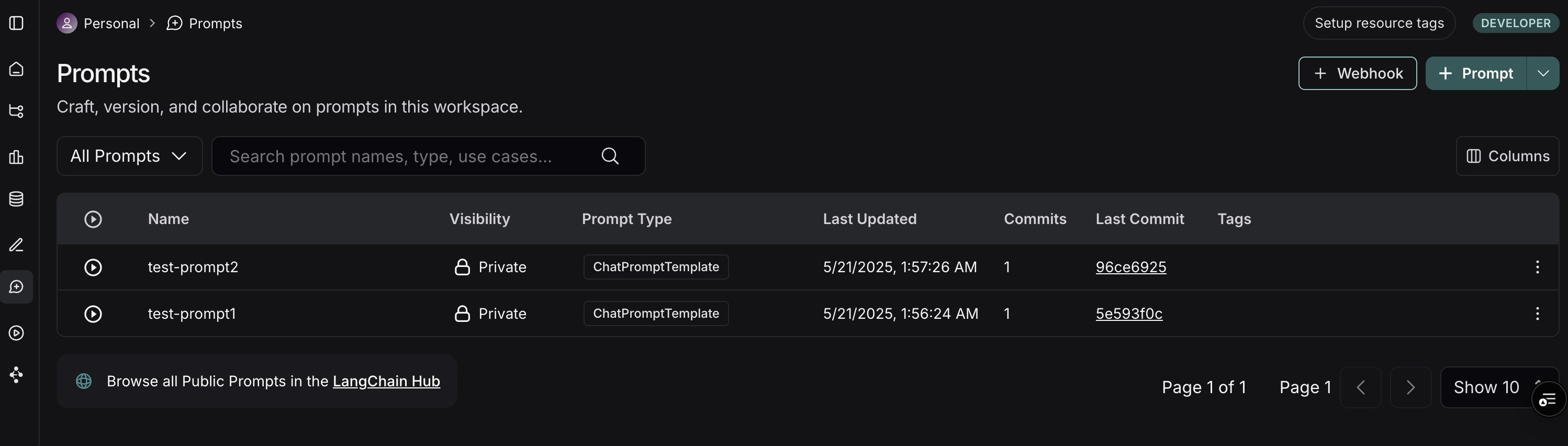
- 在 Prompts 页面的右上角,点击 + Webhook 按钮。
- 您将看到一个用于配置 Webhook 的表单:
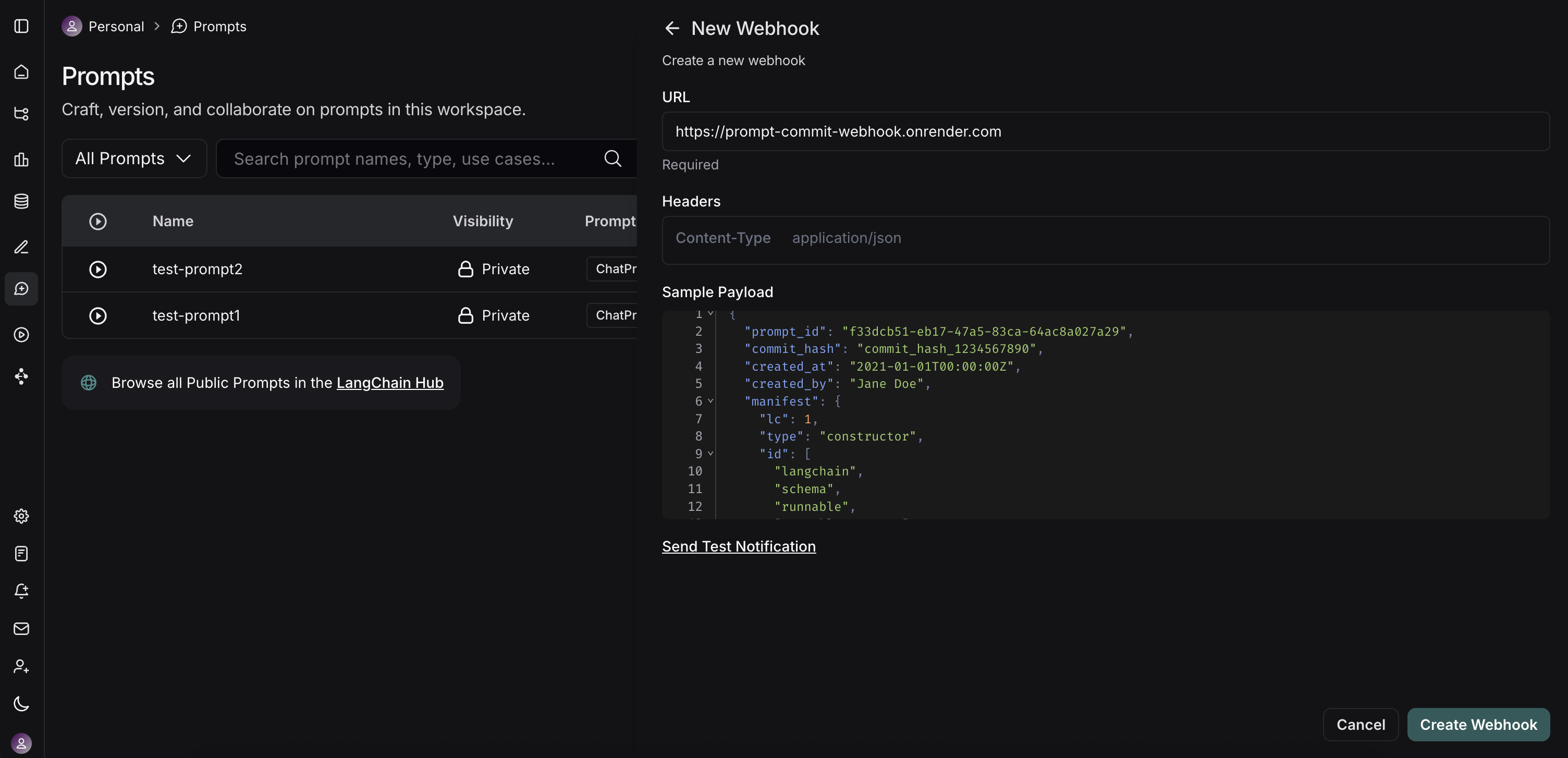
- Webhook URL: 输入您已部署的 FastAPI 服务器端点的完整公共 URL。对于我们的示例服务器,这将是
https://prompt-commit-webhook.onrender.com/webhook/commit。 - Headers(可选):
- Webhook URL: 输入您已部署的 FastAPI 服务器端点的完整公共 URL。对于我们的示例服务器,这将是
- 您可以添加自定义头部,LangSmith 将在每个 Webhook 请求中发送这些头部。
- 测试 Webhook: LangSmith 提供了一个“Send Test Notification”按钮。使用此按钮向您的服务器发送一个示例负载。检查您的服务器日志(例如在 Render 上),以确保它接收到请求并成功处理(或调试任何问题)。
- 保存 Webhook 配置。
工作流程实践
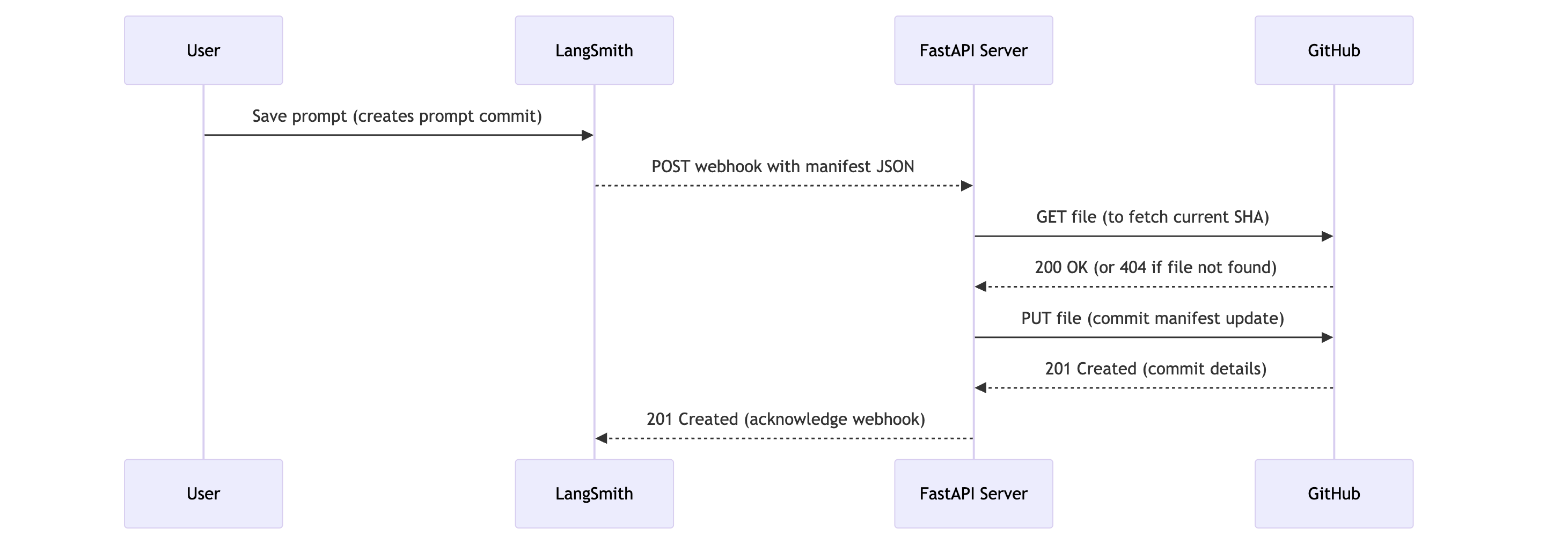
现在,一切设置就绪后,以下是发生的情况:
- 提示修改: 用户(开发人员或非技术团队成员)在 LangSmith UI 中修改提示并保存,创建一个新的“提示提交”。
- Webhook 触发: LangSmith 检测到这个新的提示提交并触发配置的 Webhook。
- HTTP 请求: LangSmith 向您的 FastAPI 服务器的公共 URL(例如
https://prompt-commit-webhook.onrender.com/webhook/commit)发送一个 HTTP POST 请求。此请求的正文包含整个工作区的 JSON 提示清单。 - 服务器接收负载: 您的 FastAPI 服务器的端点接收到请求。
- GitHub 提交: 服务器从请求体中解析 JSON 清单。然后,它使用配置的 GitHub 个人访问令牌、仓库所有者、仓库名称、文件路径和分支来:
- 检查清单文件是否已存在于指定分支的仓库中,以获取其 SHA(这对于更新现有文件是必需的)。
- 使用最新的提示清单创建一个新的提交,如果文件已存在则更新它。提交消息将指示这是来自 LangSmith 的更新。
- 确认: 您应该会在 GitHub 仓库中看到新的提交。
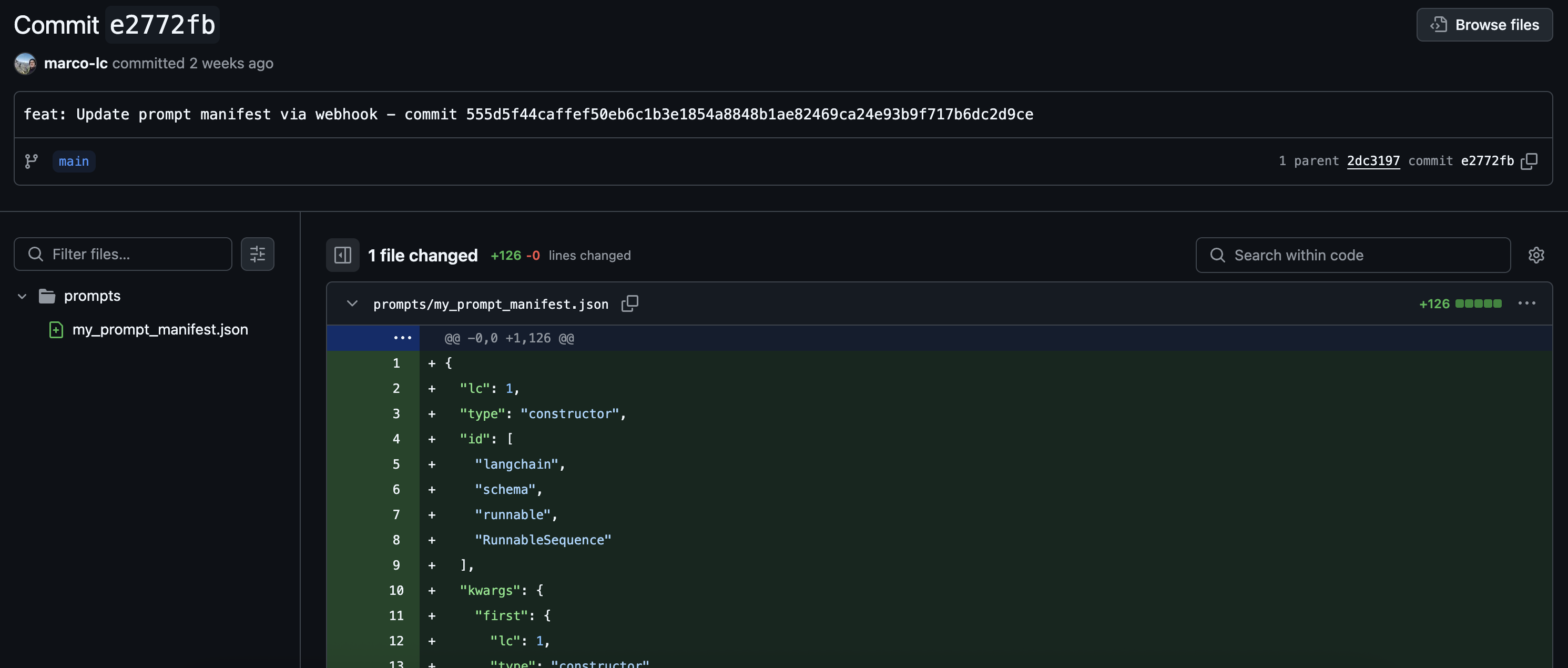
您现在已经成功地将 LangSmith 提示与 GitHub 同步!
超越简单的提交
我们的示例 FastAPI 服务器执行整个提示清单的直接提交。然而,这只是一个起点。您可以扩展服务器的功能以执行更复杂的操作:
- 细粒度提交: 解析清单,如果您希望在仓库中