
主题
本教程将指导您如何基于用户反馈优化分类器。分类器非常适合进行优化,因为通常很容易收集期望的输出,这使得基于用户反馈创建少量示例变得简单。这正是我们将在本示例中要做的。
目标
在本示例中,我们将构建一个根据标题对 GitHub 问题进行分类的机器人。它将接收一个标题,并将其分类到多个不同的类别之一。然后,我们将开始收集用户反馈,并利用这些反馈来塑造分类器的性能。
开始使用
首先,我们将进行设置,以便将所有追踪记录发送到特定项目。我们可以通过设置环境变量来实现:
python
import os
os.environ["LANGSMITH_PROJECT"] = "classifier"
然后,我们可以创建初始应用程序。这将是一个非常简单的函数,它接收一个 GitHub 问题标题并尝试为其打上标签。
python
import openai
from langsmith import traceable, Client
import uuid

client = openai.Client()

available_topics = [
    "bug",
    "improvement",
    "new_feature",
    "documentation",
    "integration",
]

prompt_template = """Classify the type of the issue as one of {topics}.
Issue: {text}"""

@traceable(
    run_type="chain",
    name="Classifier",
)
def topic_classifier(
    topic: str):
    return client.chat.completions.create(
        model="gpt-4o-mini",
        temperature=0,
        messages=[
            {
                "role": "user",
                "content": prompt_template.format(
                    topics=','.join(available_topics),
                    text=topic,
                )
            }
        ],
    ).choices[0].message.content
然后我们可以开始与它交互。在交互时,我们将预先生成 LangSmith 运行 ID 并将其传递给此函数。我们这样做是为了稍后可以附加反馈。
以下是我们如何调用应用程序:
python
from langsmith import uuid7

run_id = uuid7()
topic_classifier(
    "fix bug in LCEL",
    langsmith_extra={"run_id": run_id})
以下是我们之后如何附加反馈。我们可以以两种形式收集反馈。
首先,我们可以收集"积极"反馈——这是针对模型预测正确的示例。
python
ls_client = Client()
run_id = uuid7()
topic_classifier(
    "fix bug in LCEL",
    langsmith_extra={"run_id": run_id})
ls_client.create_feedback(
    run_id,
    key="user-score",
    score=1.0,
)
接下来,我们可以专注于收集对应于生成"修正"的反馈。在此示例中,模型会将其分类为 bug,而我实际上希望它被分类为 documentation。
python
ls_client = Client()
run_id = uuid7()
topic_classifier(
    "fix bug in documentation",
    langsmith_extra={"run_id": run_id})
ls_client.create_feedback(
    run_id,
    key="correction",
    correction="documentation")
设置自动化
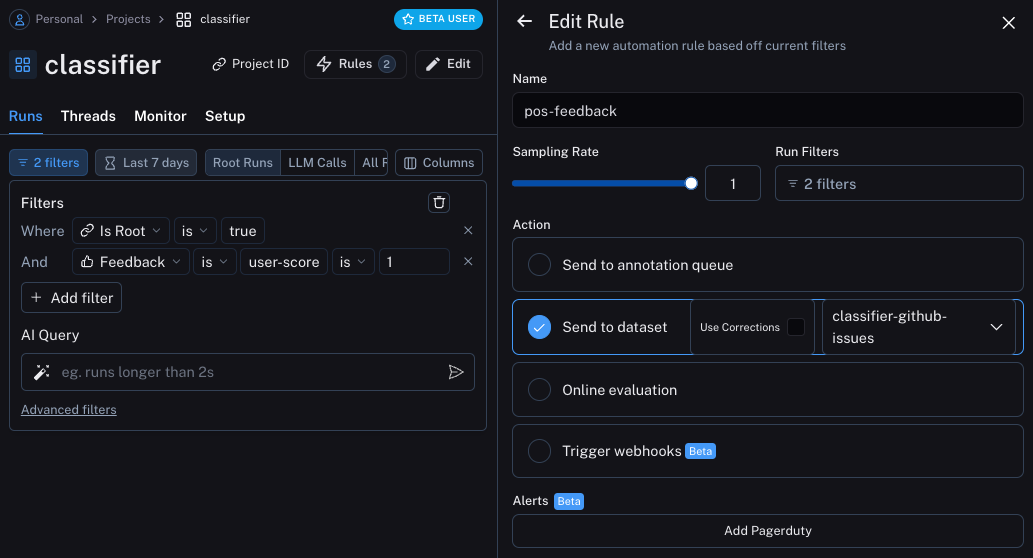
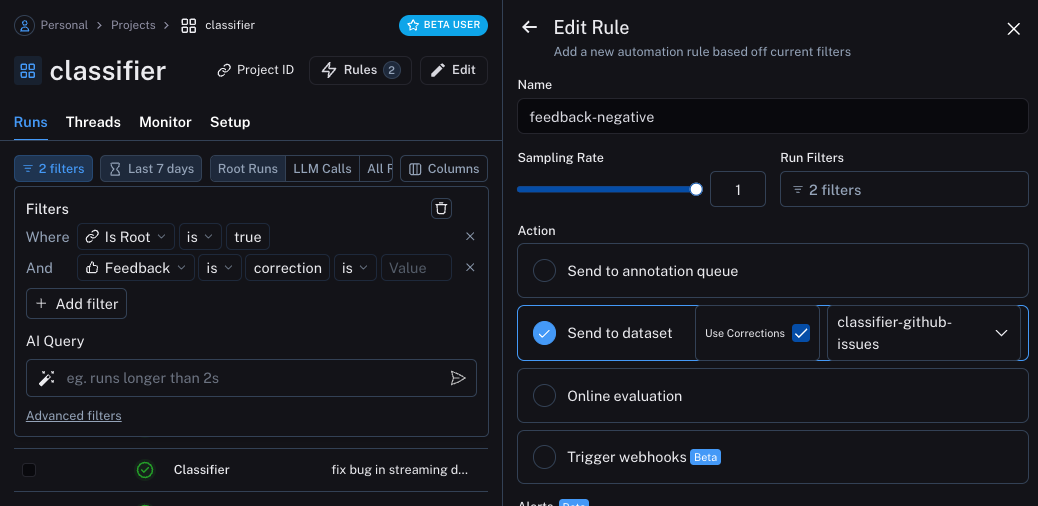
我们现在可以设置自动化,将带有某种形式反馈的示例移动到数据集中。我们将设置两个自动化,一个用于积极反馈,另一个用于消极反馈。
第一个自动化将获取所有带有积极反馈的运行,并自动将它们添加到数据集中。这背后的逻辑是,任何带有积极反馈的运行都可以在未来的迭代中用作良好示例。让我们创建一个名为 classifier-github-issues 的数据集来添加这些数据。
第二个自动化将获取所有带有修正的运行,并使用 webhook 将它们添加到数据集中。创建此 webhook 时,我们将选择"使用修正"选项。此选项将使从运行创建数据集时,使用修正作为数据点的黄金标准输出,而不是使用运行的输出。
更新应用程序
我们现在可以更新代码,拉取我们正在发送运行的数据集。拉取下来后,我们可以创建一个包含其中示例的字符串。然后我们可以将这个字符串作为提示的一部分!
python
### 新代码 ###
# 初始化 LangSmith 客户端,以便我们可以用它来获取数据集
ls_client = Client()

# 创建一个函数,接收示例列表并将其格式化为字符串
def create_example_string(examples):
    final_strings = []
    for e in examples:
        final_strings.append(f"Input: {e.inputs['topic']}\n> {e.outputs['output']}")
    return "\n\n".join(final_strings)
### 新代码 ###

client = openai.Client()

available_topics = [
    "bug",
    "improvement",
    "new_feature",
    "documentation",
    "integration",
]

prompt_template = """Classify the type of the issue as one of {topics}.

Here are some examples:
{examples}

Begin!
Issue: {text}
>"""

@traceable(
    run_type="chain",
    name="Classifier",
)
def topic_classifier(
    topic: str):
    # 我们现在可以从数据集中拉取示例
    # 我们在函数内部执行此操作,以便始终获取最新的示例,
    # 但如果需要,也可以在外面执行并缓存以提高速度
    examples = list(ls_client.list_examples(dataset_name="classifier-github-issues"))  # <- 新代码
    example_string = create_example_string(examples)
    return client.chat.completions.create(
        model="gpt-4o-mini",
        temperature=0,
        messages=[
            {
                "role": "user",
                "content": prompt_template.format(
                    topics=','.join(available_topics),
                    text=topic,
                    examples=example_string,
                )
            }
        ],
    ).choices[0].message.content
如果现在使用与之前类似的输入运行应用程序,我们可以看到它正确地学会了任何与文档相关的内容(即使是 bug)都应该被分类为 documentation
python
ls_client = Client()
run_id = uuid7()
topic_classifier(
    "address bug in documentation",
    langsmith_extra={"run_id": run_id})
对示例进行语义搜索
我们可以做的另一件事是只使用语义上最相似的示例。当您开始积累大量示例时,这很有用。
为此,我们可以首先定义一个函数来查找 k 个最相似的示例:
python
import numpy as np

def find_similar(examples, topic, k=5):
    inputs = [e.inputs['topic'] for e in examples] + [topic]
    vectors = client.embeddings.create(input=inputs, model="text-embedding-3-small")
    vectors = [e.embedding for e in vectors.data]
    vectors = np.array(vectors)
    args = np.argsort(-vectors.dot(vectors[-1])[:-1])[:5]
    examples = [examples[i] for i in args]
    return examples
然后我们可以在应用程序中使用它
python
ls_client = Client()

def create_example_string(examples):
    final_strings = []
    for e in examples:
        final_strings.append(f"Input: {e.inputs['topic']}\n> {e.outputs['output']}")
    return "\n\n".join(final_strings)

client = openai.Client()

available_topics = [
    "bug",
    "improvement",
    "new_feature",
    "documentation",
    "integration",
]

prompt_template = """Classify the type of the issue as one of {topics}.

Here are some examples:
{examples}

Begin!
Issue: {text}
>"""

@traceable(
    run_type="chain",
    name="Classifier",
)
def topic_classifier(
    topic: str):
    examples = list(ls_client.list_examples(dataset_name="classifier-github-issues"))
    examples = find_similar(examples, topic)
    example_string = create_example_string(examples)
    return client.chat.completions.create(
        model="gpt-4o-mini",
        temperature=0,
        messages=[
            {
                "role": "user",
                "content": prompt_template.format(
                    topics=','.join(available_topics),
                    text=topic,
                    examples=example_string,
                )
            }
        ],
    ).choices[0].message.content