
主题
具有对话界面的 AI 应用(如聊天机器人)通过与用户进行多次交互(也称为对话轮次)来运行。在评估此类应用的性能时,核心概念如构建数据集和定义评估器以及用于评判应用输出的指标仍然有用。然而,您可能还会发现在您的应用和用户之间运行模拟,然后评估这个动态创建的轨迹也很有用。
这样做的一些优势包括:
- 与基于预先存在的完整轨迹数据集进行评估相比,更容易上手
- 从初始查询到成功或失败解决的端到端覆盖
- 能够检测应用在多次迭代中的重复行为或上下文丢失
缺点是,由于您将评估范围扩大到包含多个轮次,与根据数据集的静态输入评估应用的单个输出相比,一致性会降低。
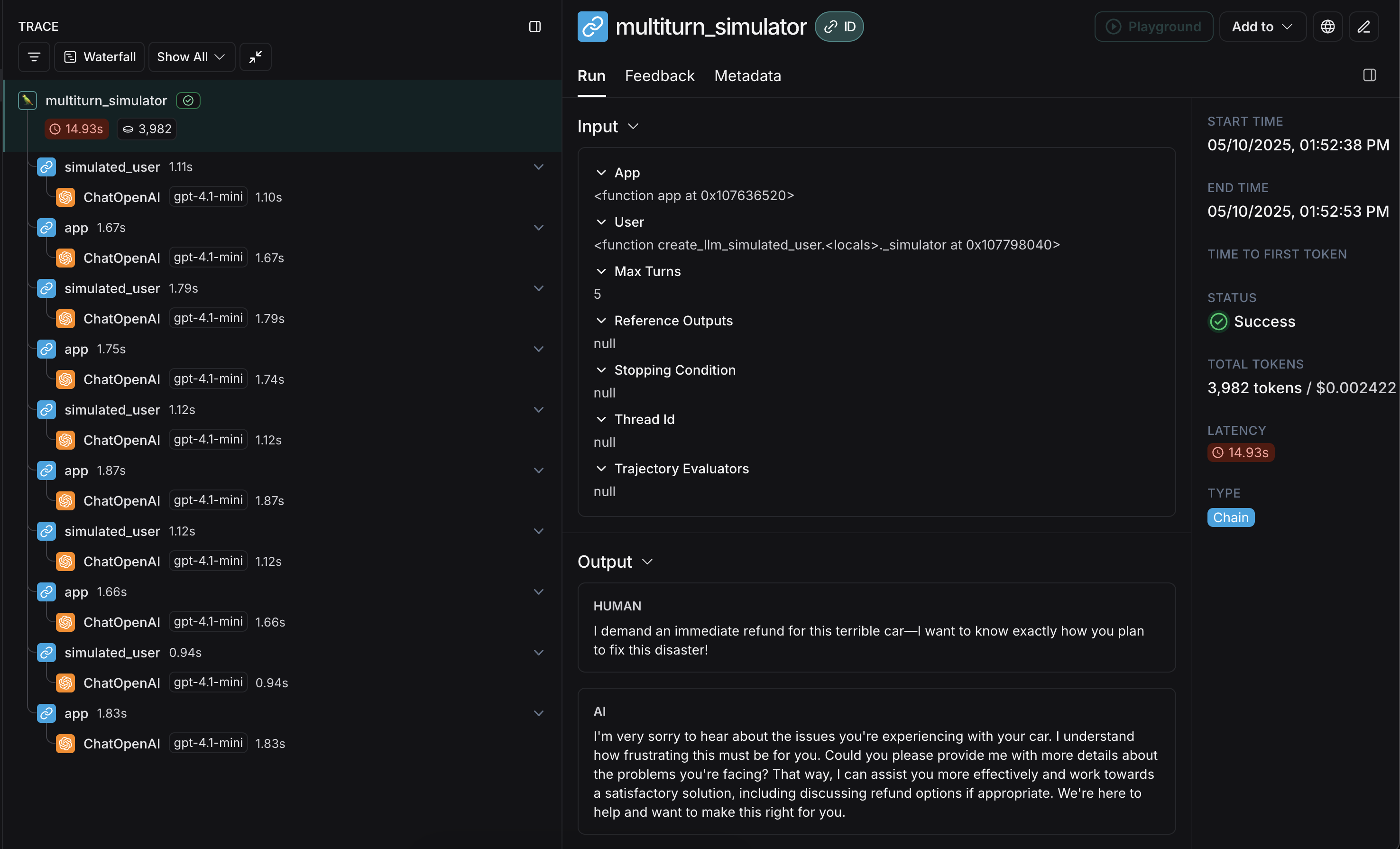
本指南将向您展示如何模拟多轮交互,并使用开源的 openevals 包来评估它们,该包包含预构建的评估器和其他用于评估 AI 应用的便捷资源。它也将使用 OpenAI 模型,不过您也可以使用其他提供商。
设置
首先,确保已安装所需的依赖项:
bash
pip install -U langsmith openevalsbash
npm install langsmith openevals如果您使用 yarn 作为包管理器,您还需要手动安装 @langchain/core 作为 openevals 的对等依赖项。对于一般的 LangSmith 评估,这不是必需的。
并设置您的环境变量:
bash
export LANGSMITH_TRACING="true"
export LANGSMITH_API_KEY="<您的 LangSmith API 密钥>"
export OPENAI_API_KEY="<您的 OpenAI API 密钥>"
运行模拟
开始之前,您需要两个主要组件:
app:您的应用程序,或包装它的函数。必须接受单个聊天消息(包含 "role" 和 "content" 键的字典)作为输入参数,并接受thread_id作为关键字参数。应接受其他关键字参数,因为未来版本可能会添加更多参数。返回一个至少包含 role 和 content 键的聊天消息作为输出。user:模拟用户。在本指南中,我们将使用一个名为create_llm_simulated_user的导入预构建函数,该函数使用 LLM 生成用户响应,不过您也可以创建自己的模拟用户。
openevals 中的模拟器在每一轮将来自 user 的单个聊天消息传递给您的 app。因此,如果需要,您应该根据 thread_id 在内部有状态地跟踪当前历史记录。
这是一个模拟多轮客户支持交互的示例。本指南使用一个简单的聊天应用,该应用包装了对 OpenAI 聊天补全 API 的单个调用,但这里应该是您调用应用程序或代理的地方。在此示例中,我们的模拟用户扮演一个特别具有攻击性的客户角色:
python
from openevals.simulators import run_multiturn_simulation, create_llm_simulated_user
from openevals.types import ChatCompletionMessage
from langsmith.wrappers import wrap_openai
from openai import OpenAI

# 包装 OpenAI 客户端以进行追踪
client = wrap_openai(OpenAI())
history = {}

# 您的应用程序逻辑
def app(inputs: ChatCompletionMessage, *, thread_id: str, **kwargs):
    if thread_id not in history:
        history[thread_id] = []
    history[thread_id].append(inputs)
    # inputs 是一个包含 role 和 content 的消息对象
    res = client.chat.completions.create(
        model="gpt-4.1-mini",
        messages=[
            {
                "role": "system",
                "content": "您是一位耐心且善解人意的客户服务代理。",
            },
        ] + history[thread_id],
    )
    response_message = res.choices[0].message
    history[thread_id].append(response_message)
    return response_message

user = create_llm_simulated_user(
    system="您是一位咄咄逼人且充满敌意的客户,想要为他们的汽车退款。",
    model="openai:gpt-4.1-mini",
)

# 使用新函数直接运行模拟
simulator_result = run_multiturn_simulation(
    app=app,
    user=user,
    max_turns=5,
)
print(simulator_result)
typescript
import { OpenAI } from "openai";
import { wrapOpenAI } from "langsmith/wrappers/openai";
import {
  createLLMSimulatedUser,
  runMultiturnSimulation,
  type ChatCompletionMessage,
} from "openevals";

// 包装 OpenAI 客户端以进行追踪
const client = wrapOpenAI(new OpenAI());
const history = {};

// 您的应用程序逻辑
const app = async ({ inputs, threadId }: { inputs: ChatCompletionMessage, threadId: string }) => {
  if (history[threadId] === undefined) {
    history[threadId] = [];
  }
  history[threadId].push(inputs);
  const res = await client.chat.completions.create({
    model: "gpt-4.1-mini",
    messages: [
      {
        role: "system",
        content:
          "您是一位耐心且善解人意的客户服务代理。",
      },
      inputs,
    ],
  });
  const responseMessage = res.choices[0].message;
  history[threadId].push(responseMessage);
  return res.choices[0].message;
};

const user = createLLMSimulatedUser({
  system: "您是一位咄咄逼人且充满敌意的客户,想要为他们的汽车退款。",
  model: "openai:gpt-4.1-mini",
});

const result = await runMultiturnSimulation({
  app,
  user,
  maxTurns: 5,
});
console.log(result);
响应如下所示:
json
{
  "trajectory": [
    {
      "role": "user",
      "content": "这辆破车完全是个灾难!我要求立即全额退款。你们怎么敢卖给我这么一辆毫无价值的车!",
      "id": "chatcmpl-BUpXa07LaM7wXbyaNnng1Gtn5Dsbh"
    },
    {
      "role": "assistant",
      "content": "听到您的经历我深感抱歉,理解这一定非常令人沮丧。我希望尽可能顺利地解决这个问题。您能否提供一些关于车辆问题的详细信息?一旦我掌握了更多信息,我将尽力协助您找到解决方案,无论是退款还是其他选择。感谢您的耐心。",
      "refusal": null,
      "annotations": [],
      "id": "d7520f6a-7cf8-46f8-abe4-7df04f134482"
    },
    "...",
    {
      "role": "assistant",
      "content": "我完全理解您的沮丧,并真诚地为给您带来的不便道歉。\n\n请给我一点时间审查您的案例,我将尽我所能加快您的退款流程。非常感谢您的耐心,我致力于让您满意地解决此事。",
      "refusal": null,
      "annotations": [],
      "id": "a0536d4f-9353-4cfa-84df-51c8d29e076d"
    }
  ]
}
模拟首先从模拟的 user 生成初始查询,然后来回传递响应聊天消息,直到达到 max_turns(您也可以传递一个 stopping_condition,该函数接收当前轨迹并返回 True 或 False - 有关更多信息,请参阅 OpenEvals README)。返回值是构成对话轨迹的最终聊天消息列表。
有几种配置模拟用户的方法,例如让它在模拟的前几轮返回固定响应,以及整个模拟的配置。有关完整详细信息,请查看 OpenEvals README。
最终的轨迹将类似于这样,其中穿插着您的 app 和 user 的响应:
恭喜!您刚刚运行了第一次多轮模拟。接下来,我们将介绍如何在 LangSmith 实验中运行它。
在 LangSmith 实验中运行
您可以将多轮模拟的结果用作 LangSmith 实验的一部分,以跟踪性能并随时间推移观察进展。对于这些部分,熟悉至少一种 LangSmith 的 pytest(仅限 Python)、Vitest/Jest(仅限 JS)或 evaluate 运行器会有所帮助。
使用 pytest 或 Vitest/Jest
如果您正在使用 LangSmith 测试框架集成之一,则可以在运行模拟时将 OpenEvals 评估器数组作为 trajectory_evaluators 参数传入。这些评估器将在模拟结束时运行,将最终的聊天消息列表作为 outputs 关键字参数接收。因此,您传递的 trajectory_evaluator 必须接受此关键字参数。
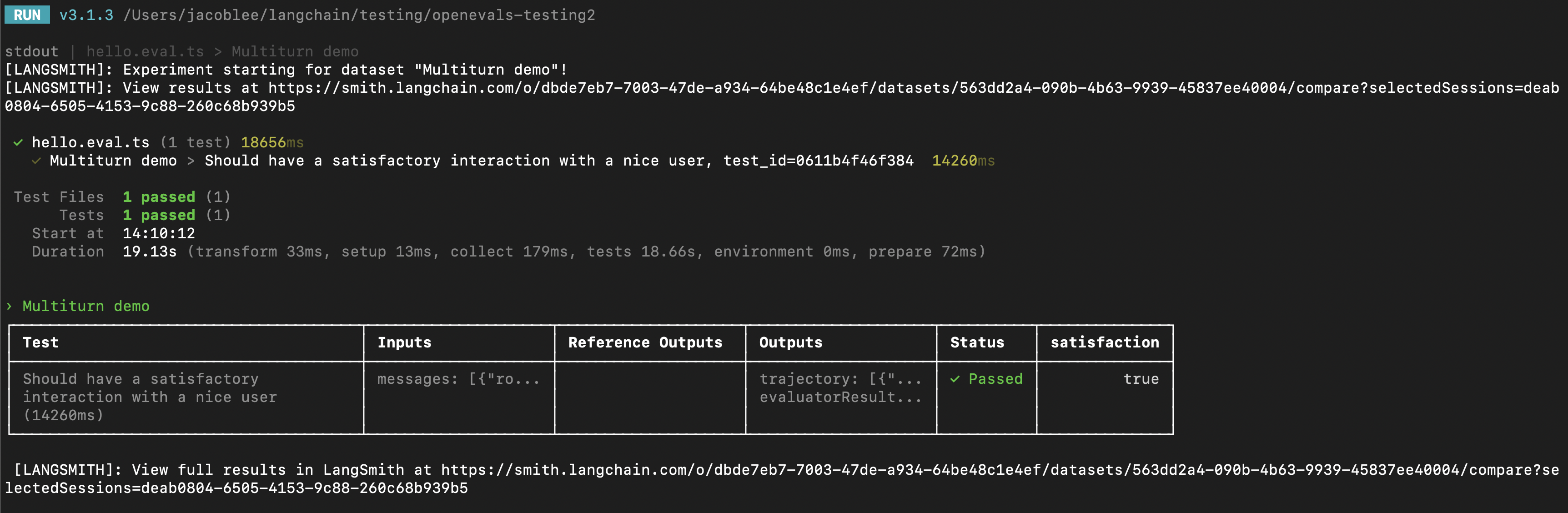
以下是一个示例:
python
from openevals.simulators import run_multiturn_simulation, create_llm_simulated_user
from openevals.llm import create_llm_as_judge
from openevals.types import ChatCompletionMessage
from langsmith import testing as t
from langsmith.wrappers import wrap_openai
from openai import OpenAI
import pytest

@pytest.mark.langsmith
def test_multiturn_message_with_openai():
    inputs = {"role": "user", "content": "我想为我的车退款!"}
    t.log_inputs(inputs)
    # 包装 OpenAI 客户端以进行追踪
    client = wrap_openai(OpenAI())
    history = {}

    def app(inputs: ChatCompletionMessage, *, thread_id: str):
        if thread_id not in history:
            history[thread_id] = []
        history[thread_id] = history[thread_id] + [inputs]
        res = client.chat.completions.create(
            model="gpt-4.1-nano",
            messages=[
                {
                    "role": "system",
                    "content": "您是一位耐心且善解人意的客户服务代理。",
                }
            ]
            + history[thread_id],
        )
        response = res.choices[0].message
        history[thread_id].append(response)
        return response

    user = create_llm_simulated_user(
        system="您是一位想要为他们的车退款的友好客户。",
        model="openai:gpt-4.1-nano",
        fixed_responses=[
            inputs,
        ],
    )
    trajectory_evaluator = create_llm_as_judge(
        model="openai:o3-mini",
        prompt="根据以下对话,用户是否满意?\n{outputs}",
        feedback_key="satisfaction",
    )
    res = run_multiturn_simulation(
        app=app,
        user=user,
        trajectory_evaluators=[trajectory_evaluator],
        max_turns=5,
    )
    t.log_outputs(res)
    # 可选地,断言评估器将交互评分为了满意。
    # 如果 "score" 为 False,这将导致整个测试用例失败。
    assert res["evaluator_results"][0]["score"]
typescript
import { OpenAI } from "openai";
import { wrapOpenAI } from "langsmith/wrappers/openai";
import * as ls from "langsmith/vitest";
import { expect } from "vitest";
// import * as ls from "langsmith/jest";
// import { expect } from "@jest/globals";
import {
  createLLMSimulatedUser,
  runMultiturnSimulation,
  createLLMAsJudge,
  type ChatCompletionMessage,
} from "openevals";

const client = wrapOpenAI(new OpenAI());

ls.describe("多轮演示", () => {
  ls.test(
    "应该与友好用户进行满意的交互",
    {
      inputs: {
        messages: [{ role: "user" as const, content: "我想为我的车退款!" }],
      },
    },
    async ({ inputs }) => {
      const history = {};
      // 创建自定义应用函数
      const app = async (
        { inputs, threadId }: { inputs: ChatCompletionMessage, threadId: string }
      ) => {
        if (history[threadId] === undefined) {
          history[threadId] = [];
        }
        history[threadId].push(inputs);
        const res = await client.chat.completions.create({
          model: "gpt-4.1-nano",
          messages: [
            {
              role: "system",
              content:
                "您是一位耐心且善解人意的客户服务代理",
            },
            inputs,
          ],
        });
        const responseMessage = res.choices[0].message;
        history[threadId].push(responseMessage);
        return responseMessage;
      };

      const user = createLLMSimulatedUser({
        system:
          "您是一位想要为他们的车退款的友好客户。",
        model: "openai:gpt-4.1-nano",
        fixedResponses: inputs.messages,
      });

      const trajectoryEvaluator = createLLMAsJudge({
        model: "openai:o3-mini",
        prompt:
          "根据以下对话,用户是否满意?\n{outputs}",
        feedbackKey: "satisfaction",
      });

      const result = await runMultiturnSimulation({
        app,
        user,
        trajectoryEvaluators: [trajectoryEvaluator],
        maxTurns: 5,
      });

      ls.logOutputs(result);
      // 可选地,断言评估器将交互评分为了满意。
      // 如果 "score" 为 false,这将导致整个测试用例失败。
      expect(result.evaluatorResults[0].score).toBe(true);
    }
  );
});
LangSmith 将自动检测并记录从传递的 trajectory_evaluators 返回的反馈,并将其添加到实验中。还要注意,测试用例使用模拟用户上的 fixed_responses 参数以特定输入开始对话,您可以记录该输入并将其作为存储数据集的一部分。
您可能还会发现将模拟用户的系统提示作为记录数据集的一部分也很方便。
使用 evaluate
您也可以使用 evaluate 运行器来评估模拟的多轮交互。这与 pytest/Vitest/Jest 示例在以下方面略有不同:
- 模拟应该是您的
target函数的一部分,并且您的目标函数应返回最终轨迹。- 这将使轨迹成为 LangSmith 传递给您的评估器的
outputs。
- 这将使轨迹成为 LangSmith 传递给您的评估器的
- 不应使用
trajectory_evaluators参数,而应将您的评估器作为参数传递给evaluate()方法。 - 您需要一个包含输入和(可选)参考轨迹的现有数据集。
以下是一个示例:
python
from openevals.simulators import run_multiturn_simulation, create_llm_simulated_user
from openevals.llm import create_llm_as_judge
from openevals.types import ChatCompletionMessage
from langsmith.wrappers import wrap_openai
from langsmith import Client
from openai import OpenAI

ls_client = Client()
examples = [
    {
        "inputs": {
            "messages": [{ "role": "user", "content": "我想为我的车退款!" }]
        },
    },
]
dataset = ls_client.create_dataset(dataset_name="multiturn-starter")
ls_client.create_examples(
    dataset_id=dataset.id,
    examples=examples,
)
trajectory_evaluator = create_llm_as_judge(
    model="openai:o3-mini",
    prompt="根据以下对话,用户是否满意?\n{outputs}",
    feedback_key="satisfaction",
)

def target(inputs: dict):
    # 包装 OpenAI 客户端以进行追踪
    client = wrap_openai(OpenAI())
    history = {}

    def app(next_message: ChatCompletionMessage, *, thread_id: str):
        if thread_id not in history:
            history[thread_id] = []
        history[thread_id] = history[thread_id] + [next_message]
        res = client.chat.completions.create(
            model="gpt-4.1-nano",
            messages=[
                {
                    "role": "system",
                    "content": "您是一位耐心且善解人意的客户服务代理。",
                }
            ]
            + history[thread_id],
        )
        response = res.choices[0].message
        history[thread_id].append(response)
        return response

    user = create_llm_simulated_user(
        system="您是一位想要为他们的车退款的友好客户。",
        model="openai:gpt-4.1-nano",
        fixed_responses=inputs["messages"],
    )
    res = run_multiturn_simulation(
        app=app,
        user=user,
                max_turns=5,
    )
    return res["trajectory"]

results = ls_client.evaluate(
    target,
    data=dataset.name,
    evaluators=[trajectory_evaluator],
)
typescript
import { OpenAI } from "openai";
import { Client } from "langsmith";
import { wrapOpenAI } from "langsmith/wrappers/openai";
import { evaluate } from "langsmith/evaluation";
import {
  createLLMSimulatedUser,
  runMultiturnSimulation,
  createLLMAsJudge,
  type ChatCompletionMessage,
} from "openevals";

const lsClient = new Client();
const inputs = {
  messages: [
    {
      role: "user",
      content: "我想为我的车退款!",
    },
  ],
};
const datasetName = "多轮起始数据集";
const dataset = await lsClient.createDataset(datasetName);
await lsClient.createExamples([{ inputs, dataset_id: dataset.id }]);

const trajectoryEvaluator = createLLMAsJudge({
  model: "openai:o3-mini",
  prompt:
    "根据以下对话,用户是否满意?\n{outputs}",
  feedbackKey: "satisfaction",
});

const client = wrapOpenAI(new OpenAI());

const target = async (inputs: { messages: ChatCompletionMessage[]}) => {
  const history = {};
  // 创建自定义应用函数
  const app = async (
    { inputs: nextMessage, threadId }: { inputs: ChatCompletionMessage, threadId: string }
  ) => {
    if (history[threadId] === undefined) {
      history[threadId] = [];
    }
    history[threadId].push(nextMessage);
    const res = await client.chat.completions.create({
      model: "gpt-4.1-nano",
      messages: [
        {
          role: "system",
          content:
            "您是一位耐心且善解人意的客户服务代理",
        },
        nextMessage,
      ],
    });
    const responseMessage = res.choices[0].message;
    history[threadId].push(responseMessage);
    return responseMessage;
  };

  const user = createLLMSimulatedUser({
    system:
      "您是一位想要为他们的车退款的友好客户。",
    model: "openai:gpt-4.1-nano",
    fixedResponses: inputs.messages,
  });

  const result = await runMultiturnSimulation({
    app,
    user,
    maxTurns: 5,
  });
  return result.trajectory;
};

await evaluate(target, {
  data: datasetName,
  evaluators: [trajectoryEvaluator],
});
修改模拟用户人格
上述示例对所有输入示例运行相同的模拟用户人格,由传递给 create_llm_simulated_user 的 system 参数定义。如果您想为数据集中的特定项使用不同的人格,可以更新您的数据集示例以包含一个包含所需 system 提示词的额外字段,然后在创建模拟用户时传入该字段,如下所示:
python
from openevals.simulators import run_multiturn_simulation, create_llm_simulated_user
from openevals.llm import create_llm_as_judge
from openevals.types import ChatCompletionMessage
from langsmith.wrappers import wrap_openai
from langsmith import Client
from openai import OpenAI

ls_client = Client()
examples = [
    {
        "inputs": {
            "messages": [{ "role": "user", "content": "我想为我的车退款!" }],
            "simulated_user_prompt": "您是一位愤怒且好斗的客户,想要为他们的车退款。"
        },
    },
    {
        "inputs": {
            "messages": [{ "role": "user", "content": "请给我的车办理退款。" }],
            "simulated_user_prompt": "您是一位想要为他们的车退款的友好客户。",
        },
    }
]
dataset = ls_client.create_dataset(dataset_name="带有人格的多轮数据集")
ls_client.create_examples(
    dataset_id=dataset.id,
    examples=examples,
)
trajectory_evaluator = create_llm_as_judge(
    model="openai:o3-mini",
    prompt="根据以下对话,用户是否满意?\n{outputs}",
    feedback_key="satisfaction",
)

def target(inputs: dict):
    # 包装 OpenAI 客户端以进行追踪
    client = wrap_openai(OpenAI())
    history = {}

    def app(next_message: ChatCompletionMessage, *, thread_id: str):
        if thread_id not in history:
            history[thread_id] = []
        history[thread_id] = history[thread_id] + [next_message]
        res = client.chat.completions.create(
            model="gpt-4.1-nano",
            messages=[
                {
                    "role": "system",
                    "content": "您是一位耐心且善解人意的客户服务代理。",
                }
            ]
            + history[thread_id],
        )
        response = res.choices[0].message
        history[thread_id].append(response)
        return response

    user = create_llm_simulated_user(
        system=inputs["simulated_user_prompt"],
        model="openai:gpt-4.1-nano",
        fixed_responses=inputs["messages"],
    )
    res = run_multiturn_simulation(
        app=app,
        user=user,
        max_turns=5,
    )
    return res["trajectory"]

results = ls_client.evaluate(
    target,
    data=dataset.name,
    evaluators=[trajectory_evaluator],
)
typescript
import { OpenAI } from "openai";
import { Client } from "langsmith";
import { wrapOpenAI } from "langsmith/wrappers/openai";
import { evaluate } from "langsmith/evaluation";
import {
  createLLMSimulatedUser,
  runMultiturnSimulation,
  createLLMAsJudge,
  type ChatCompletionMessage,
} from "openevals";

const lsClient = new Client();
const datasetName = "带有人格的多轮数据集";
const dataset = await lsClient.createDataset(datasetName);
const examples = [{
  inputs: {
    messages: [
      {
        role: "user",
        content: "我想为我的车退款!",
      },
    ],
    simulated_user_prompt: "您是一位愤怒且好斗的客户,想要为他们的车退款。",
  },
  dataset_id: dataset.id,
}, {
  inputs: {
    messages: [
      {
        role: "user",
        content: "请给我的车办理退款。"
      }
    ],
    simulated_user_prompt: "您是一位想要为他们的车退款的友好客户。",
  },
  dataset_id: dataset.id,
}];
await lsClient.createExamples(examples);

const trajectoryEvaluator = createLLMAsJudge({
  model: "openai:o3-mini",
  prompt:
    "根据以下对话,用户是否满意?\n{outputs}",
  feedbackKey: "satisfaction",
});

const client = wrapOpenAI(new OpenAI());

const target = async (inputs: {
  messages: ChatCompletionMessage[],
  simulated_user_prompt: string,
}) => {
  const history = {};
  // 创建自定义应用函数
  const app = async (
    { inputs: nextMessage, threadId }: { inputs: ChatCompletionMessage, threadId: string }
  ) => {
    if (history[threadId] === undefined) {
      history[threadId] = [];
    }
    history[threadId].push(nextMessage);
    const res = await client.chat.completions.create({
      model: "gpt-4.1-nano",
      messages: [
        {
          role: "system",
          content:
            "您是一位耐心且善解人意的客户服务代理",
        },
        nextMessage,
      ],
    });
    const responseMessage = res.choices[0].message;
    history[threadId].push(responseMessage);
    return responseMessage;
  };

  const user = createLLMSimulatedUser({
    system: inputs.simulated_user_prompt,
    model: "openai:gpt-4.1-nano",
    fixedResponses: inputs.messages,
  });

  const result = await runMultiturnSimulation({
    app,
    user,
    maxTurns: 5,
  });
  return result.trajectory;
};

await evaluate(target, {
  data: datasetName,
  evaluators: [trajectoryEvaluator],
});
下一步
您刚才看到了一些用于模拟多轮交互并在 LangSmith 评估中运行它们的技术。
以下是您可能想要下一步探索的一些话题:
您还可以浏览 OpenEvals 说明文件 以了解更多关于预置评估器的内容。