
主题
部分用户倾向于在 LangSmith 之外管理他们的数据集和运行实验,但希望使用 LangSmith UI 来查看结果。这可以通过我们的端点实现。
本指南将展示如何使用 REST API 上传评估(evals),以 Python 中的 requests 库为例。不过,同样的原理适用于任何语言。
请求体模式
上传实验需要指定实验和数据集的相关高层级信息,以及实验内各个示例(examples)和运行(runs)的个体数据。results 中的每个对象代表实验中的一个“行”——一个单独的数据集示例及其关联的运行。请注意,dataset_id 和 dataset_name 指的是您外部系统中的数据集标识符,将用于在单个数据集中将外部实验分组。它们不应引用 LangSmith 中已存在的数据集(除非该数据集是通过此端点创建的)。
您可以使用以下模式将实验上传到 /datasets/upload-experiment 端点:
json
{
  "experiment_name": "string (required)",
  "experiment_description": "string (optional)",
  "experiment_start_time": "datetime (required)",
  "experiment_end_time": "datetime (required)",
  "dataset_id": "uuid (optional - an external dataset id, used to group experiments together)",
  "dataset_name": "string (optional - must provide either dataset_id or dataset_name)",
  "dataset_description": "string (optional)",
  "experiment_metadata": { // Object (any shape - optional)
    "key": "value"
  },
  "summary_experiment_scores": [ // List of summary feedback objects (optional)
    {
      "key": "string (required)",
      "score": "number (optional)",
      "value": "string (optional)",
      "comment": "string (optional)",
      "feedback_source": { // Object (optional)
        "type": "string (required)"
      },
      "feedback_config": { // Object (optional)
        "type": "string enum: continuous, categorical, or freeform",
        "min": "number (optional)",
        "max": "number (optional)",
        "categories": [ // List of feedback category objects (optional)
          {
            "value": "number (required)",
            "label": "string (optional)"
          }
        ]
      },
      "created_at": "datetime (optional - defaults to now)",
      "modified_at": "datetime (optional - defaults to now)",
      "correction": "Object or string (optional)"
    }
  ],
  "results": [ // List of experiment row objects (required)
    {
      "row_id": "uuid (required)",
      "inputs": { // Object (required - any shape). This will
        "key": "val" // be the input to both the run and the dataset example.
      },
      "expected_outputs": { // Object (optional - any shape).
        "key": "val" // These will be the outputs of the dataset examples.
      },
      "actual_outputs": { // Object (optional - any shape).
        "key": "val" // These will be the outputs of the runs.
      },
      "evaluation_scores": [ // List of feedback objects for the run (optional)
        {
          "key": "string (required)",
          "score": "number (optional)",
          "value": "string (optional)",
          "comment": "string (optional)",
          "feedback_source": { // Object (optional)
            "type": "string (required)"
          },
          "feedback_config": { // Object (optional)
            "type": "string enum: continuous, categorical, or freeform",
            "min": "number (optional)",
            "max": "number (optional)",
            "categories": [ // List of feedback category objects (optional)
              {
                "value": "number (required)",
                "label": "string (optional)"
              }
            ]
          },
          "created_at": "datetime (optional - defaults to now)",
          "modified_at": "datetime (optional - defaults to now)",
          "correction": "Object or string (optional)"
        }
      ],
      "start_time": "datetime (required)", // The start/end times for the runs will be used to
      "end_time": "datetime (required)", // calculate latency. They must all fall between the
      "run_name": "string (optional)", // start and end times for the experiment.
      "error": "string (optional)",
      "run_metadata": { // Object (any shape - optional)
        "key": "value"
      }
    }
  ]
}
响应 JSON 将是一个字典,包含 experiment 和 dataset 键,每个键都是一个对象,包含有关所创建实验和数据集的相关信息。
注意事项
您可以通过在多次调用中提供相同的 dataset_id 或 dataset_name,将多个实验上传到同一个数据集。您的实验将被分组到单个数据集下,并且您将能够使用比较视图来比较实验之间的结果。
请确保各个行的开始和结束时间都在实验的开始和结束时间之间。
您必须提供 dataset_id 或 dataset_name 中的一个。如果只提供 ID 且数据集尚不存在,我们将为您生成一个名称;反之,如果只提供名称,我们将为您生成一个 ID。
您不能将实验上传到不是通过此端点创建的数据集。上传实验仅支持外部管理的数据集。
示例请求
以下是对 /datasets/upload-experiment 的一个简单调用示例。这是一个基本示例,仅使用最重要的字段进行说明。
python
import os
import requests

body = {
    "experiment_name": "My external experiment",
    "experiment_description": "An experiment uploaded to LangSmith",
    "dataset_name": "my-external-dataset",
    "summary_experiment_scores": [
        {
            "key": "summary_accuracy",
            "score": 0.9,
            "comment": "Great job!"
        }
    ],
    "results": [
        {
            "row_id": "<<uuid>>",
            "inputs": {
                "input": "Hello, what is the weather in San Francisco today?"
            },
            "expected_outputs": {
                "output": "Sorry, I am unable to provide information about the current weather."
            },
            "actual_outputs": {
                "output": "The weather is partly cloudy with a high of 65."
            },
            "evaluation_scores": [
                {
                    "key": "hallucination",
                    "score": 1,
                    "comment": "The chatbot made up the weather instead of identifying that "
                               "they don't have enough info to answer the question. This is "
                               "a hallucination."
                }
            ],
            "start_time": "2024-08-03T00:12:39",
            "end_time": "2024-08-03T00:12:41",
            "run_name": "Chatbot"
        },
        {
            "row_id": "<<uuid>>",
            "inputs": {
                "input": "Hello, what is the square root of 49?"
            },
            "expected_outputs": {
                "output": "The square root of 49 is 7."
            },
            "actual_outputs": {
                "output": "7."
            },
            "evaluation_scores": [
                {
                    "key": "hallucination",
                    "score": 0,
                    "comment": "The chatbot correctly identified the answer. This is not a "
                               "hallucination."
                }
            ],
            "start_time": "2024-08-03T00:12:40",
            "end_time": "2024-08-03T00:12:42",
            "run_name": "Chatbot"
        }
    ],
    "experiment_start_time": "2024-08-03T00:12:38",
    "experiment_end_time": "2024-08-03T00:12:43"
}

resp = requests.post(
    "https://api.smith.langchain.com/api/v1/datasets/upload-experiment", # Update appropriately for self-hosted installations or the EU region
    json=body,
    headers={"x-api-key": os.environ["LANGSMITH_API_KEY"]}
)

print(resp.json())
以下是收到的响应:
json
{
  "dataset": {
    "name": "my-external-dataset",
    "description": null,
    "created_at": "2024-08-03T00:36:23.289730+00:00",
    "data_type": "kv",
    "inputs_schema_definition": null,
    "outputs_schema_definition": null,
    "externally_managed": true,
    "id": "<<uuid>>",
    "tenant_id": "<<uuid>>",
    "example_count": 0,
    "session_count": 0,
    "modified_at": "2024-08-03T00:36:23.289730+00:00",
    "last_session_start_time": null
  },
  "experiment": {
    "start_time": "2024-08-03T00:12:38",
    "end_time": "2024-08-03T00:12:43+00:00",
    "extra": null,
    "name": "My external experiment",
    "description": "An experiment uploaded to LangSmith",
    "default_dataset_id": null,
    "reference_dataset_id": "<<uuid>>",
    "trace_tier": "longlived",
    "id": "<<uuid>>",
    "run_count": null,
    "latency_p50": null,
    "latency_p99": null,
    "first_token_p50": null,
    "first_token_p99": null,
    "total_tokens": null,
    "prompt_tokens": null,
    "completion_tokens": null,
    "total_cost": null,
    "prompt_cost": null,
    "completion_cost": null,
    "tenant_id": "<<uuid>>",
    "last_run_start_time": null,
    "last_run_start_time_live": null,
    "feedback_stats": null,
    "session_feedback_stats": null,
    "run_facets": null,
    "error_rate": null,
    "streaming_rate": null,
    "test_run_number": 1
  }
}
请注意,实验结果中的延迟和反馈统计数据为 null,因为运行尚未有机会被持久化,这可能需要几秒钟。如果您保存实验 ID 并在几秒钟后再次查询,您将看到所有统计数据(尽管 tokens/成本 仍将为 null,因为我们在请求体中没有要求此信息)。
在 UI 中查看实验
现在,登录 UI 并点击您新创建的数据集!您应该会看到一个实验: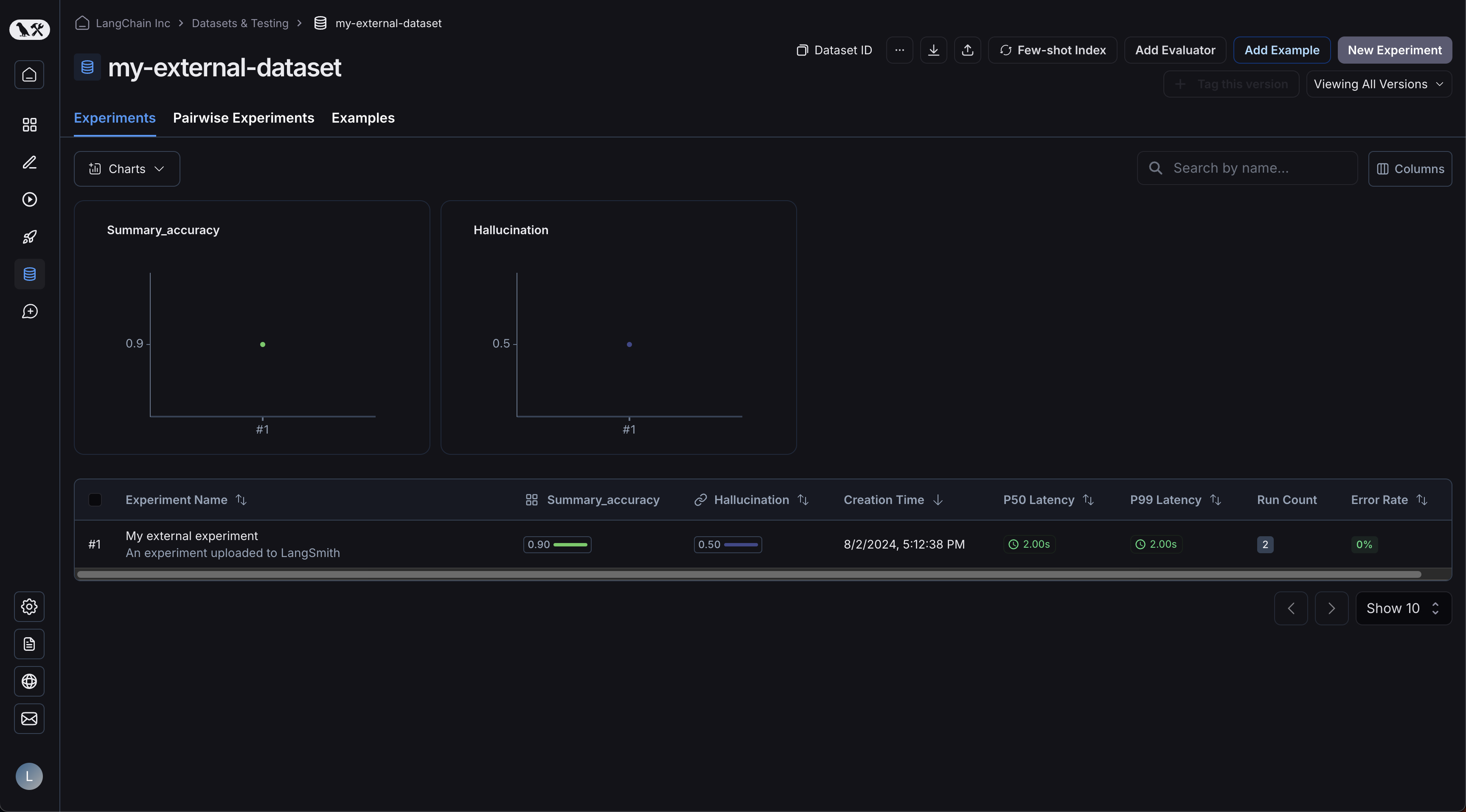
您的示例已上传: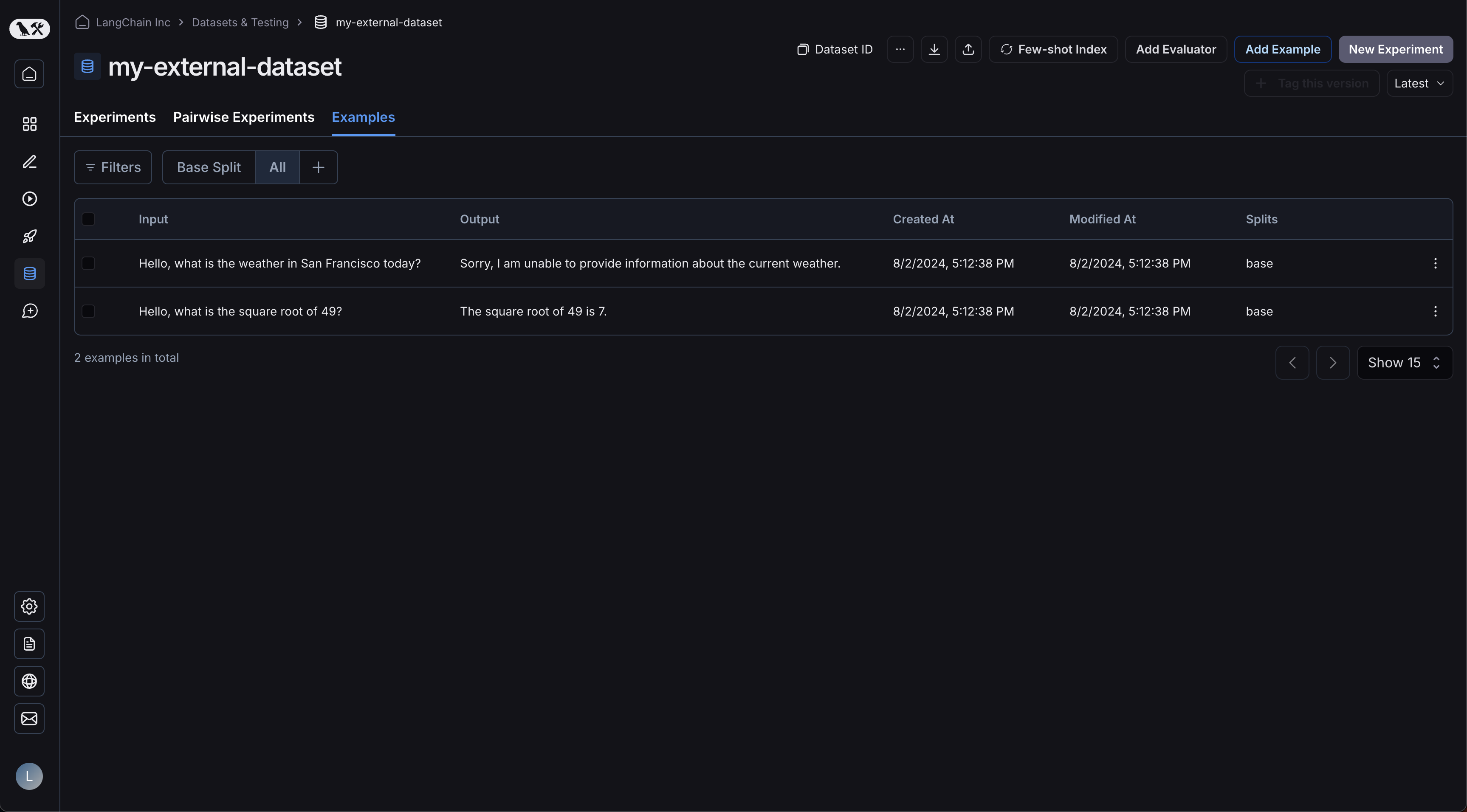
点击您的实验将进入比较视图: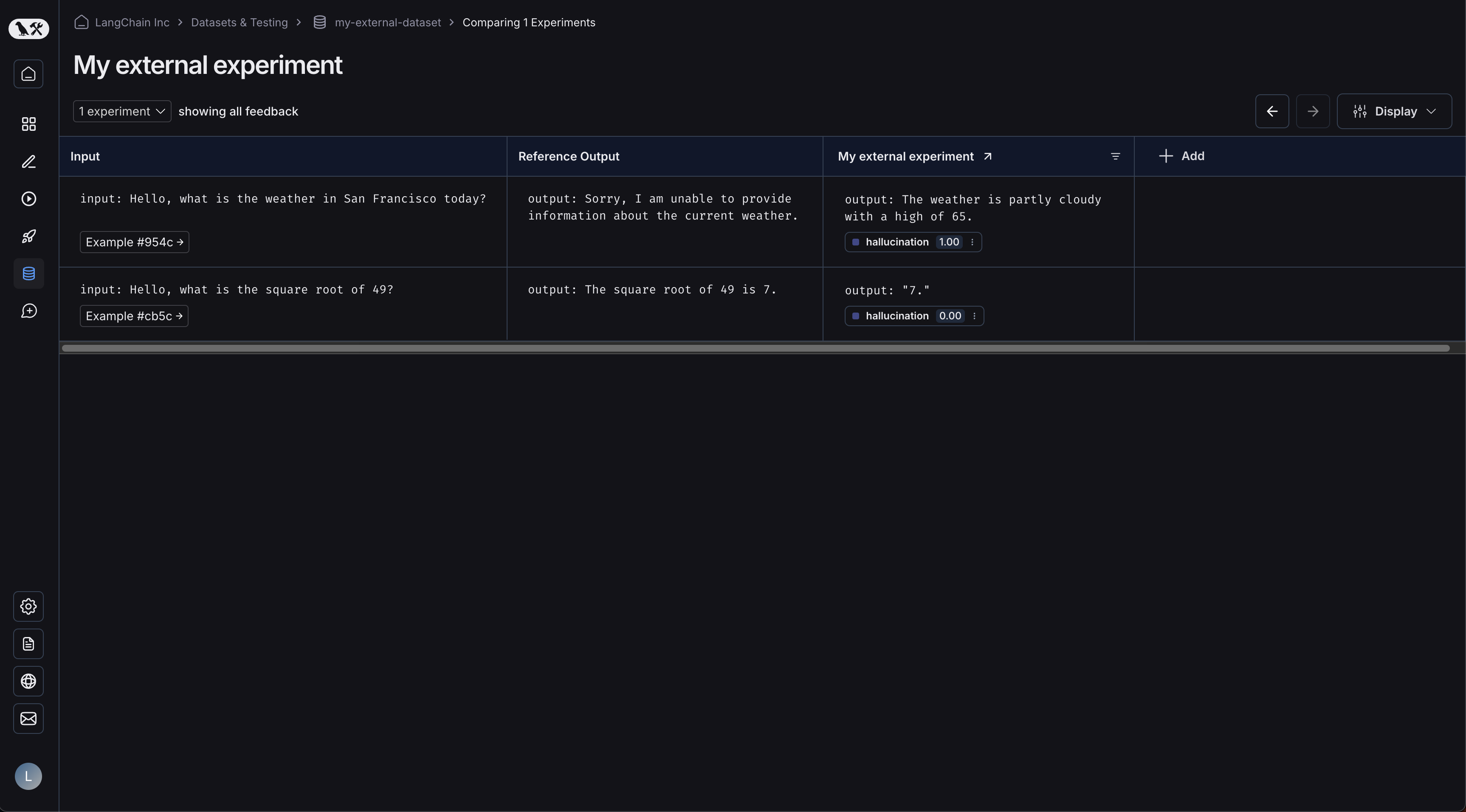
当您向数据集上传更多实验时,您将能够比较结果,并在比较视图中轻松识别回归问题。