
主题
LangSmith 通过 OpenTelemetry 集成支持追踪 Google Agent Development Kit (ADK) 应用程序。本指南将向您展示如何自动捕获来自 Google ADK 代理的追踪数据,并将其发送到 LangSmith 进行监控和分析。
安装
使用您首选的包管理器安装所需的包:
bash
pip install langsmith google-adkbash
uv add langsmith google-adk需要 LangSmith Python SDK 版本 langsmith>=0.4.26 以获得最佳的 OpenTelemetry 支持。
设置
1. 配置环境变量
设置您的 LangSmith API 密钥和项目名称:
bash
export LANGSMITH_API_KEY=<your_langsmith_api_key>
export LANGSMITH_PROJECT=<your_project_name>
2. 配置 OpenTelemetry 集成
在您的 Google ADK 应用程序中,导入并配置 LangSmith 的 OpenTelemetry 集成。这将自动为 OpenTelemetry 检测 Google ADK 的跨度(span)。
python
from langsmith.integrations.otel import configure

# 配置 LangSmith 追踪
configure(project_name="adk-example")  # 可选:也可以使用 LANGSMITH_PROJECT 和 LANGSMITH_API_KEY 环境变量
或者,您可以使用 Openinference 的 GoogleADKInstrumentor:
python
from langsmith.integrations.otel import configure
from openinference.instrumentation.google_adk import GoogleADKInstrumentor

# 配置 LangSmith 追踪
configure(project_name="adk-example")

# 直接检测 Google ADK
GoogleADKInstrumentor().instrument()
您无需手动设置任何 OpenTelemetry 环境变量或配置导出器——configure() 会自动处理所有事情。
3. 创建并运行您的 ADK 代理
配置完成后,您的 Google ADK 应用程序将自动向 LangSmith 发送追踪数据:
此示例包含一个最小化的应用程序,用于设置代理、会话和运行器,然后发送消息并流式处理事件。
python
import asyncio
from langsmith.integrations.otel import configure
from google.adk import Runner
from google.adk.agents import LlmAgent
from google.adk.sessions import InMemorySessionService
from google.genai import types

# 配置 LangSmith 追踪
configure(project_name="travel-assistant")

# 定义您的工具
def get_flight_info(destination: str, departure_date: str) -> dict:
    """获取目的地的航班信息。"""
    return {
        "destination": destination,
        "departure_date": departure_date,
        "price": "$450",
        "duration": "5h 30m",
        "airline": "Example Airways"
    }

def get_hotel_recommendations(city: str, check_in: str) -> dict:
    """获取城市的酒店推荐。"""
    return {
        "city": city,
        "check_in": check_in,
        "hotels": [
            {"name": "Grand Plaza Hotel", "rating": 4.5, "price": "$120/night"},
            {"name": "City Center Inn", "rating": 4.2, "price": "$95/night"}
        ]
    }

async def main():
    # 创建您的 ADK 代理
    agent = LlmAgent(
        name="travel_assistant",
        tools=[get_flight_info, get_hotel_recommendations],
        model="gemini-2.5-flash-lite",
        instruction="您是一个乐于助人的旅行助手,可以帮助处理航班和酒店事宜。",
    )

    # 设置会话服务和运行器
    session_service = InMemorySessionService()
    runner = Runner(
        app_name="travel_app",
        agent=agent,
        session_service=session_service
    )

    # 创建一个会话
    user_id = "traveler_456"
    session_id = "session_789"
    await session_service.create_session(
        app_name="travel_app",
        user_id=user_id,
        session_id=session_id
    )

    # 向代理发送消息
    new_message = types.Content(
        parts=[types.Part(text="我需要预订一张 3 月 15 日飞往巴黎的机票,并找一家好酒店。")],
        role="user",
    )

    # 运行代理并处理事件
    events = runner.run(
        user_id=user_id,
        session_id=session_id,
        new_message=new_message,
    )

    for event in events:
        print(event)

if __name__ == "__main__":
    asyncio.run(main())
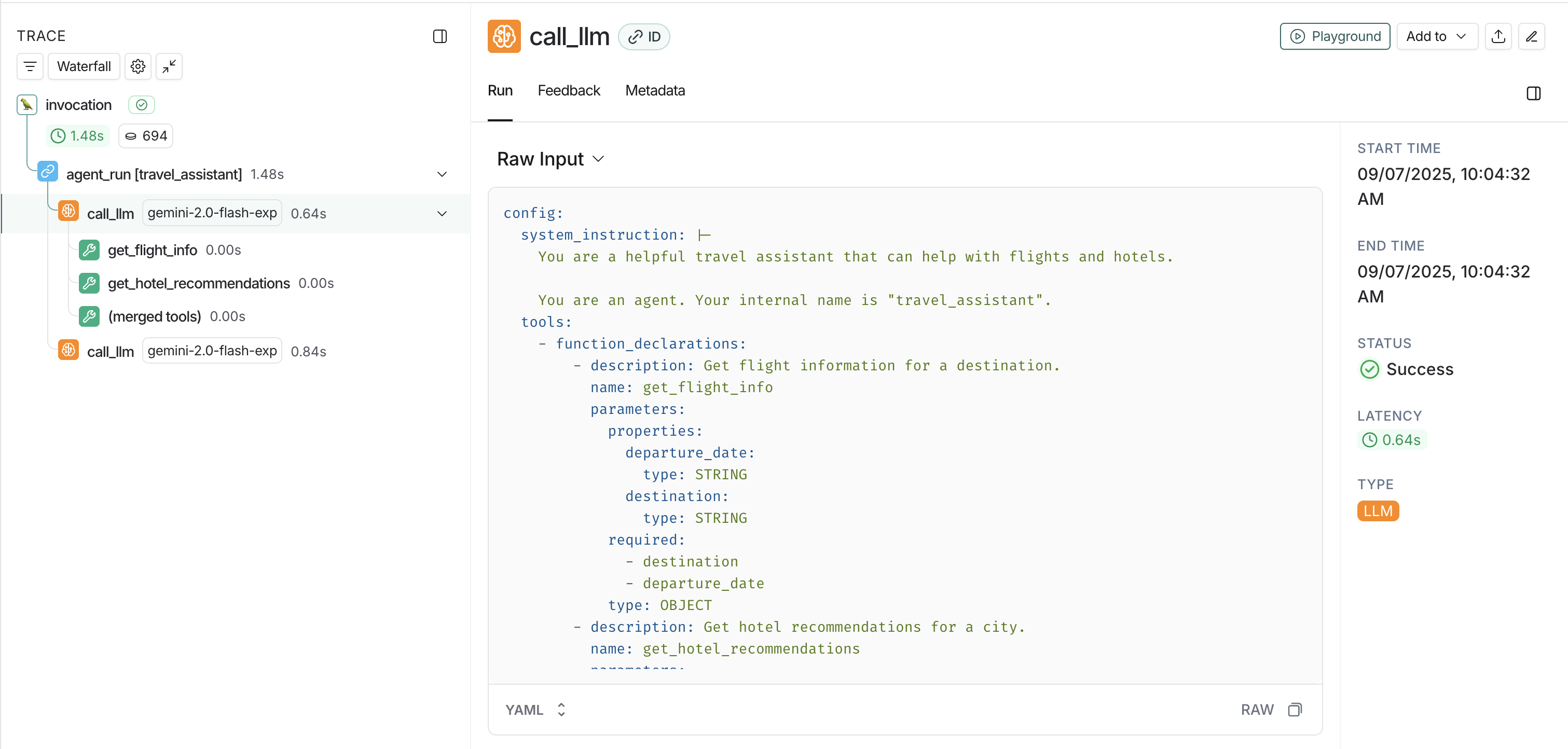
在 LangSmith 中查看追踪数据
- 代理对话:用户与您的 ADK 代理之间的完整对话流程。
- 工具调用:您的代理进行的单个函数调用。
- 模型交互:使用 Gemini 模型的 LLM 请求和响应。
- 会话信息:用于组织相关追踪数据的用户和会话上下文。
- 模型交互:使用 Gemini 模型的 LLM 请求和响应。
高级用法
自定义元数据和标签
您可以通过在 ADK 应用程序中设置跨度(span)属性来向追踪数据添加自定义元数据:
python
from opentelemetry import trace

# 获取当前的追踪器
tracer = trace.get_tracer(__name__)

async def main():
    with tracer.start_as_current_span("travel_booking_session") as span:
        # 添加自定义元数据
        span.set_attribute("langsmith.metadata.user_type", "premium")
        span.set_attribute("langsmith.metadata.booking_source", "mobile_app")
        span.set_attribute("langsmith.span.tags", "travel,booking,premium")

        agent = LlmAgent(
            name="travel_assistant",
            tools=[get_flight_info, get_hotel_recommendations],
            model="gemini-2.5-flash-lite",
            instruction="You are a helpful travel assistant that can help with flights and hotels.",
        )

        session_service = InMemorySessionService()
        runner = Runner(
            app_name="travel_app",
            agent=agent,
            session_service=session_service
        )

        # 继续您的 ADK 工作流
        # ...