
主题
本指南解释了使用子图(subgraph)的机制。子图是一个图,在另一个图中用作节点。
子图适用于:
- 构建多智能体系统
- 在多个图中复用一组节点
- 分布式开发:当希望不同团队独立处理图的不同部分时,可以将每个部分定义为一个子图。只要子图接口(输入和输出模式)得到遵守,父图就可以在不知道子图任何细节的情况下构建
添加子图时,需要定义父图和子图之间的通信方式:
- 从节点调用图 —— 子图从父图的节点内部调用
- 将图添加为节点 —— 子图直接作为节点添加到父图中,并与父图共享状态键(state keys)
环境设置
bash
pip install -U langgraphbash
uv add langgraph从节点调用图
实现子图的一种简单方法是从另一个图的节点内部调用一个图。在这种情况下,子图可以拥有与父图完全不同的模式(没有共享的键)。例如,你可能希望在多智能体系统中为每个智能体保留私有的消息历史记录。
如果你的应用属于这种情况,你需要定义一个调用子图的节点函数。该函数需要在调用子图之前将输入(父)状态转换为子图状态,并在从节点返回状态更新之前将结果转换回父状态。
python
from typing_extensions import TypedDict
from langgraph.graph.state import StateGraph, START

class SubgraphState(TypedDict):
    bar: str

# 子图

def subgraph_node_1(state: SubgraphState):
    return {"bar": "hi! " + state["bar"]}

subgraph_builder = StateGraph(SubgraphState)
subgraph_builder.add_node(subgraph_node_1)
subgraph_builder.add_edge(START, "subgraph_node_1")
subgraph = subgraph_builder.compile()

# 父图

class State(TypedDict):
    foo: str

def call_subgraph(state: State):
    # 将状态转换为子图状态
    subgraph_output = subgraph.invoke({"bar": state["foo"]})
    # 将响应转换回父状态
    return {"foo": subgraph_output["bar"]}

builder = StateGraph(State)
builder.add_node("node_1", call_subgraph)
builder.add_edge(START, "node_1")
graph = builder.compile()
完整示例:不同的状态模式
python
from typing_extensions import TypedDict
from langgraph.graph.state import StateGraph, START

# 定义子图
class SubgraphState(TypedDict):
    # 注意:这些键都没有与父图状态共享
    bar: str
    baz: str

def subgraph_node_1(state: SubgraphState):
    return {"baz": "baz"}

def subgraph_node_2(state: SubgraphState):
    return {"bar": state["bar"] + state["baz"]}

subgraph_builder = StateGraph(SubgraphState)
subgraph_builder.add_node(subgraph_node_1)
subgraph_builder.add_node(subgraph_node_2)
subgraph_builder.add_edge(START, "subgraph_node_1")
subgraph_builder.add_edge("subgraph_node_1", "subgraph_node_2")
subgraph = subgraph_builder.compile()

# 定义父图
class ParentState(TypedDict):
    foo: str

def node_1(state: ParentState):
    return {"foo": "hi! " + state["foo"]}

def node_2(state: ParentState):
    # 将状态转换为子图状态
    response = subgraph.invoke({"bar": state["foo"]})
    # 将响应转换回父状态
    return {"foo": response["bar"]}

builder = StateGraph(ParentState)
builder.add_node("node_1", node_1)
builder.add_node("node_2", node_2)
builder.add_edge(START, "node_1")
builder.add_edge("node_1", "node_2")
graph = builder.compile()

for chunk in graph.stream({"foo": "foo"}, subgraphs=True):
    print(chunk)
((), {'node_1': {'foo': 'hi! foo'}})
(('node_2:577b710b-64ae-31fb-9455-6a4d4cc2b0b9',), {'subgraph_node_1': {'baz': 'baz'}})
(('node_2:577b710b-64ae-31fb-9455-6a4d4cc2b0b9',), {'subgraph_node_2': {'bar': 'hi! foobaz'}})
((), {'node_2': {'foo': 'hi! foobaz'}})完整示例:不同的状态模式(两级子图)
这是一个包含两级子图的示例:父图 -> 子图 -> 孙图。
python
# 孙图
from typing_extensions import TypedDict
from langgraph.graph.state import StateGraph, START, END

class GrandChildState(TypedDict):
    my_grandchild_key: str

def grandchild_1(state: GrandChildState) -> GrandChildState:
    # 注意:子图或父图的键在这里不可访问
    return {"my_grandchild_key": state["my_grandchild_key"] + ", how are you"}

grandchild = StateGraph(GrandChildState)
grandchild.add_node("grandchild_1", grandchild_1)

grandchild.add_edge(START, "grandchild_1")
grandchild.add_edge("grandchild_1", END)

grandchild_graph = grandchild.compile()

# 子图
class ChildState(TypedDict):
    my_child_key: str

def call_grandchild_graph(state: ChildState) -> ChildState:
    # 注意:父图或孙图的键在这里不可访问
    grandchild_graph_input = {"my_grandchild_key": state["my_child_key"]}
    grandchild_graph_output = grandchild_graph.invoke(grandchild_graph_input)
    return {"my_child_key": grandchild_graph_output["my_grandchild_key"] + " today?"}

child = StateGraph(ChildState)
# 我们在这里传递一个函数,而不仅仅是编译好的图 (`grandchild_graph`)
child.add_node("child_1", call_grandchild_graph)
child.add_edge(START, "child_1")
child.add_edge("child_1", END)
child_graph = child.compile()

# 父图
class ParentState(TypedDict):
    my_key: str

def parent_1(state: ParentState) -> ParentState:
    # 注意:子图或孙图的键在这里不可访问
    return {"my_key": "hi " + state["my_key"]}

def parent_2(state: ParentState) -> ParentState:
    return {"my_key": state["my_key"] + " bye!"}

def call_child_graph(state: ParentState) -> ParentState:
    child_graph_input = {"my_child_key": state["my_key"]}
    child_graph_output = child_graph.invoke(child_graph_input)
    return {"my_key": child_graph_output["my_child_key"]}

parent = StateGraph(ParentState)
parent.add_node("parent_1", parent_1)
# 我们在这里传递一个函数,而不仅仅是编译好的图 (`child_graph`)
parent.add_node("child", call_child_graph)
parent.add_node("parent_2", parent_2)

parent.add_edge(START, "parent_1")
parent.add_edge("parent_1", "child")
parent.add_edge("child", "parent_2")
parent.add_edge("parent_2", END)

parent_graph = parent.compile()

for chunk in parent_graph.stream({"my_key": "Bob"}, subgraphs=True):
    print(chunk)
((), {'parent_1': {'my_key': 'hi Bob'}})
(('child:2e26e9ce-602f-862c-aa66-1ea5a4655e3b', 'child_1:781bb3b1-3971-84ce-810b-acf819a03f9c'), {'grandchild_1': {'my_grandchild_key': 'hi Bob, how are you'}})
(('child:2e26e9ce-602f-862c-aa66-1ea5a4655e3b',), {'child_1': {'my_child_key': 'hi Bob, how are you today?'}})
((), {'child': {'my_key': 'hi Bob, how are you today?'}})
((), {'parent_2': {'my_key': 'hi Bob, how are you today? bye!'}})将图添加为节点
当父图和子图可以通过模式中的共享状态键(通道)进行通信时,你可以将一个图作为节点添加到另一个图中。例如,在多智能体系统中,智能体通常通过共享的消息键进行通信。
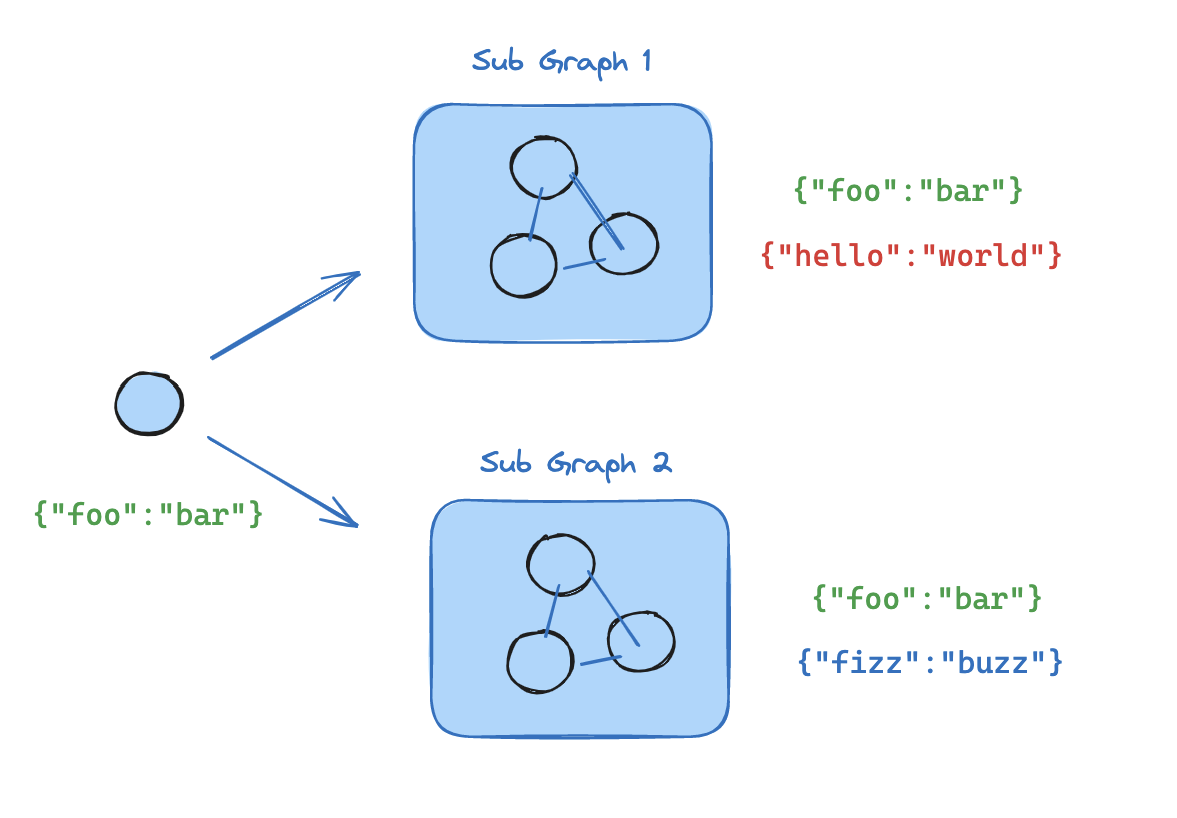
如果你的子图与父图共享状态键,可以按照以下步骤将其添加到你的图中:
:::python
- 定义子图工作流(如下例中的
subgraph_builder)并编译它 - 在定义父图工作流时,将编译好的子图传递给 @[